Monday, July 13, 2015

SWIFT Parser like MT103, MT101, MT940 etc

SWIFT Messages Parser

Any SWIFT messages can parse with header or without header. These message format MT103, MT101, MT940 etc. files can be parse using below code.  and multi massages or single massages

Code link

Multi massages Parser

           List<SwiftParser.SwiftParser> files=obj.SWIFTParser(content);
          "BasicHeaderBlock : " + files[0].BasicHeaderBlock
         "ApplicationHeaderBlock : " + files[0].ApplicationHeaderBlock 
         "TrailerBlock : " + files[0].TrailerBlock
          "Messages Count : " + files.Count.ToString() 
           datagrid.DataSource = files[0].FileMessages.FileContent

Massage Body Parser

              SwiftParser.SwiftParser file = new SwiftParser.SwiftParser();
                obj.ParserBody(file, s);
                files.Add(file);

Multi Massages Body Parser


               string[] SeparatorsField = new string[] { Environment.NewLine + "-" };
                string[] findata = content.Split(SeparatorsField, StringSplitOptions.None);
                List<SwiftParser.SwiftParser> files = new List<SwiftParser.SwiftParser>();
                foreach(string s in findata)
                {
                SwiftParser.SwiftParser file = new SwiftParser.SwiftParser();
                obj.ParserBody(file, s);
                files.Add(file);
                }

Friday, July 3, 2015

Salesforce Bulk API using C#

The Bulk API provides programmatic access to allow you to quickly load your organization's data into Salesforce

C# Code use following link


The steps are

Logging salesforce to generate session Id using Soap api or rest api

public bool login()
        {
            try
            {
                binding = new SforceService();
                LoginResult lr = binding.login(UserName, Password);
                binding.Timeout = 60000;
                binding.Url = lr.serverUrl;
                binding.SessionHeaderValue = new SessionHeader();
                binding.SessionHeaderValue.sessionId = lr.sessionId;
                sessionId = lr.sessionId;
                string ServerUrl = "https://emea.salesforce.com/services/async/34.0/job";
                int tempurl = lr.serverUrl.IndexOf(".salesforce.com");
                string ServerInstance = lr.serverUrl.Substring(8, tempurl - 8);
                ServerUrl = ServerUrl.Replace("emea", ServerInstance);
                CurentServerUrl = ServerUrl;
                  WriteLog(CurentServerUrl);
                  WriteLog("Login Successfully completed and Session Id: " + sessionId);
                return true;
              
            }
            catch (Exception ex)
            {
                WriteLog(ex.Message);
                return false;
            }
        }

Create Job using Job XML

Set Header :: X-SFDC-Session : sessionId
Set Content Type: contentType: application/xml; charset=UTF-8
Xml Data:
<?xml version="1.0" encoding="UTF-8"?>
<jobInfo xmlns="http://www.force.com/2009/06/asyncapi/dataload">
<operation>upsert</operation>
<object>Object1__c</object>
<externalIdFieldName>Email__c</externalIdFieldName>
<contentType>CSV</contentType>
</jobInfo>
Response : <?xml version="1.0" encoding="UTF-8"?><jobInfo
   xmlns="http://www.force.com/2009/06/asyncapi/dataload">
 <id>75090000002tCVOAA2</id>
 <operation>upsert</operation>
 <object>Object1__c</object>
 <createdById>00590000003i6nuAAA</createdById>
 <createdDate>2015-07-03T12:22:25.000Z</createdDate>
 <systemModstamp>2015-07-03T12:22:25.000Z</systemModstamp>
 <state>Open</state>
 <externalIdFieldName>Email__c</externalIdFieldName>
 <concurrencyMode>Parallel</concurrencyMode>
 <contentType>CSV</contentType>
 <numberBatchesQueued>0</numberBatchesQueued>
 <numberBatchesInProgress>0</numberBatchesInProgress>
 <numberBatchesCompleted>0</numberBatchesCompleted>
 <numberBatchesFailed>0</numberBatchesFailed>
 <numberBatchesTotal>0</numberBatchesTotal>
 <numberRecordsProcessed>0</numberRecordsProcessed>
 <numberRetries>0</numberRetries>
 <apiVersion>34.0</apiVersion>
 <numberRecordsFailed>0</numberRecordsFailed>
 <totalProcessingTime>0</totalProcessingTime>
 <apiActiveProcessingTime>0</apiActiveProcessingTime>
 <apexProcessingTime>0</apexProcessingTime>
</jobInfo>

Submit Data in to Job/ Create Batch in Job

  string ServerURL = "";
            string Request = "";
            string response = "";
            string ct = "";
            
            XmlDocument objXMLDoc = new XmlDocument();
            ServerURL = CurentServerUrl+"/" + JobId + "/batch";
              WriteLog(ServerURL);
            Request = Data;
            Dictionary<string, string> headder = new Dictionary<string, string>();
            headder.Add("X-SFDC-Session", sessionId);
            if (CurrentContentType == ContentType.CSV)
            {
                ct = "text/csv";
            }
            else
            {
                ct = "text/xml";
            }
            WriteLog(Request);
            response = HttpClient.dopost(ServerURL, Request, headder, "POST", ct);
            WriteLog(response);
            objXMLDoc = new XmlDocument();
            objXMLDoc.LoadXml(response);
            //response = objXMLDoc.InnerText;
            string batchId = objXMLDoc.ChildNodes[1].FirstChild.InnerText;
            currentBatchId = batchId;
            WriteLog("Batch Id :" + currentBatchId);
            return response;
Url : https://ap1.salesforce.com/services/async/34.0/job/75090000002tCVOAA2/batch
Request : 
Account__r.Account_External_Id__c,Checked__c,Datatime__c,Date__c,Email__c,Name,Number__c
3,TRUE,2015-07-03T06:55:00.000Z,2015-07-02,gs1@accesspay.com,Object1,1253
3,FALSE,2015-07-03T06:55:00.000Z,2015-07-03,gs2@accesspay.com,Object2,1254
3,TRUE,2015-07-03T06:55:00.000Z,2015-07-04,gs3@accesspay.com,Object3,1255
1,FALSE,2015-07-03T06:55:00.000Z,2015-07-05,gs4@accesspay.com,Object4,1256

Response :
<?xml version="1.0" encoding="UTF-8"?><batchInfo
   xmlns="http://www.force.com/2009/06/asyncapi/dataload">
 <id>75190000004FslWAAS</id>
 <jobId>75090000002tCVOAA2</jobId>
 <state>Queued</state>
 <createdDate>2015-07-03T12:22:59.000Z</createdDate>
 <systemModstamp>2015-07-03T12:22:59.000Z</systemModstamp>
 <numberRecordsProcessed>0</numberRecordsProcessed>
 <numberRecordsFailed>0</numberRecordsFailed>
 <totalProcessingTime>0</totalProcessingTime>
 <apiActiveProcessingTime>0</apiActiveProcessingTime>
 <apexProcessingTime>0</apexProcessingTime>

</batchInfo>

Close Job

            string ServerURL = "";
            string Request = "";
            string response = "";
            ServerURL = CurentServerUrl+"/" + JobId;
              WriteLog(ServerURL);
            Request = bulk.CloseJob;
            Dictionary<string, string> headder = new Dictionary<string, string>();
            headder.Add("X-SFDC-Session", sessionId);
            WriteLog(Request);
            response = HttpClient.dopost(ServerURL, Request, headder, "POST", "application/xml; charset=UTF-8");
            WriteLog(response);
            return response;
URL : https://ap1.salesforce.com/services/async/34.0/job/75090000002tCVOAA2

Request:
<?xml version="1.0" encoding="UTF-8"?>
<jobInfo xmlns="http://www.force.com/2009/06/asyncapi/dataload">
<state>Closed</state>
</jobInfo>
Response :
<?xml version="1.0" encoding="UTF-8"?><jobInfo
   xmlns="http://www.force.com/2009/06/asyncapi/dataload">
 <id>75090000002tCVOAA2</id>
 <operation>upsert</operation>
 <object>Object1__c</object>
 <createdById>00590000003i6nuAAA</createdById>
 <createdDate>2015-07-03T12:22:25.000Z</createdDate>
 <systemModstamp>2015-07-03T12:22:25.000Z</systemModstamp>
 <state>Closed</state>
 <externalIdFieldName>Email__c</externalIdFieldName>
 <concurrencyMode>Parallel</concurrencyMode>
 <contentType>CSV</contentType>
 <numberBatchesQueued>1</numberBatchesQueued>
 <numberBatchesInProgress>0</numberBatchesInProgress>
 <numberBatchesCompleted>0</numberBatchesCompleted>
 <numberBatchesFailed>0</numberBatchesFailed>
 <numberBatchesTotal>1</numberBatchesTotal>
 <numberRecordsProcessed>0</numberRecordsProcessed>
 <numberRetries>0</numberRetries>
 <apiVersion>34.0</apiVersion>
 <numberRecordsFailed>0</numberRecordsFailed>
 <totalProcessingTime>0</totalProcessingTime>
 <apiActiveProcessingTime>0</apiActiveProcessingTime>
 <apexProcessingTime>0</apexProcessingTime>
</jobInfo>   

Checking Batch Status

            string ServerURL = "";
            string Request = "";
            string response = "";
            string batchId = currentBatchId;
            ServerURL = CurentServerUrl+"/" + JobId + "/batch/" + batchId;
              WriteLog(ServerURL);
            Request = "";
            Dictionary<stringstring> headder = new Dictionary<stringstring>();
            headder.Add("X-SFDC-Session", sessionId);
            WriteLog(Request);
            response = HttpClient.dopost(ServerURL, Request, headder, "GET""");
            WriteLog(response);
            return response;
Url: https://ap1.salesforce.com/services/async/34.0/job/75090000002tCVOAA2/batch/75190000004FslWAAS
Response :
<?xml version="1.0" encoding="UTF-8"?><batchInfo
   xmlns="http://www.force.com/2009/06/asyncapi/dataload">
 <id>75190000004FslWAAS</id>
 <jobId>75090000002tCVOAA2</jobId>
 <state>Queued</state>
 <createdDate>2015-07-03T12:22:59.000Z</createdDate>
 <systemModstamp>2015-07-03T12:22:59.000Z</systemModstamp>
 <numberRecordsProcessed>0</numberRecordsProcessed>
 <numberRecordsFailed>0</numberRecordsFailed>
 <totalProcessingTime>0</totalProcessingTime>
 <apiActiveProcessingTime>0</apiActiveProcessingTime>
 <apexProcessingTime>0</apexProcessingTime>

</batchInfo>


Checking Batch Result

 string ServerURL = "";
            string Request = "";
            string response = "";
            string batchId = currentBatchId;
            ServerURL = CurentServerUrl+"/" + JobId + "/batch/" + batchId + "/result";
            WriteLog(ServerURL);
            Request = "";
            Dictionary<string, string> headder = new Dictionary<string, string>();
            headder.Add("X-SFDC-Session", sessionId);
            
            response = HttpClient.dopost(ServerURL, Request, headder, "GET", "");
            WriteLog(response);

            return response;

      Url: https://ap1.salesforce.com/services/async/34.0/job/75090000002tCVOAA2/batch/75190000004FslWAAS/result 
response :
"Id","Success","Created","Error"
"a039000000YArzNAAT","true","false",""
"a039000000YArzOAAT","true","false",""
"a039000000YArzPAAT","true","false",""

"a039000000YArzQAAT","true","false",""


Thursday, May 14, 2015

Backup and Restore Salesforce Project usnig Force.com IDE in Eclipes

Backup Salesforce Project:

Download eclipse  and install force.com IDE ref  click here

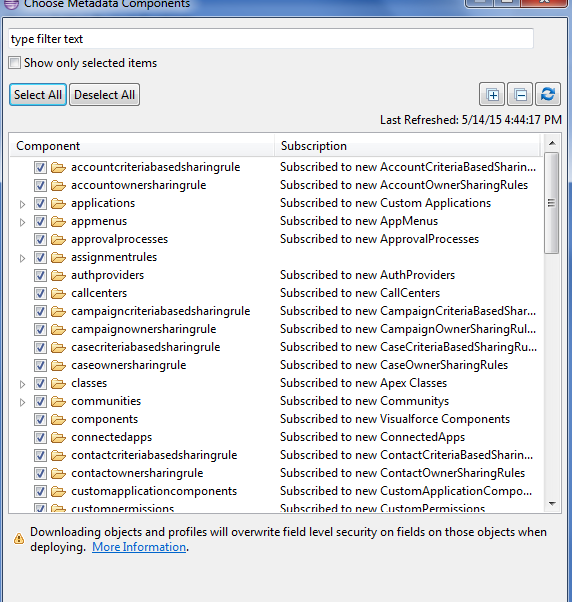
Create Force.com project. and choose all metadata component 


Copy the project your workspace location


Restore Salesforce Project.


Copy force.com project in your system.(where you want to restore.)

Right click  and select import then Choose "Existing projects in to workspace"


Select Project location and then click finish.


Wednesday, May 13, 2015

Select multiple record from list view using StandardSetController with Javascript validation

Create apex class 


public class conContactList{

   public Integer  numberofRecord{get;set;}
   public List<Contact> ContactList{get;set;}
    public conContactList(ApexPages.StandardSetController controller) 
    {
         ContactList=controller.getSelected();
        numberofRecord=ContactList.Size();
       
    }
    public List<Contact>getContactListSF()
    {
       List<Contact> NewContactList=[Select c.Id, FirstName,LastName,Phone from Contact c Where c.Id In : ContactList] ;
       return NewContactList;
    }
   
}

Visualforce page

<apex:page standardController="Contact" recordSetVar="Contact" extensions="conContactList" 
cache="true" >
<apex:outputText value="{!numberofRecord}"></apex:outputText>
<apex:pageblock Title="List of contacts" >
 <apex:pageBlockTable value="{!ContactListSF}" var="a" >
   <apex:column headervalue="First Name" value="{!a.FirstName}"  /> 
   <apex:column headervalue="Last Name" value="{!a.LastName}"  /> 
   <apex:column headervalue="Last Name" value="{!a.Phone}"  /> 
   
 </apex:pageBlockTable>
 </apex:pageblock>
</apex:page>

Javascript Button 

{!REQUIRESCRIPT("/soap/ajax/22.0/connection.js")}
{!REQUIRESCRIPT("/soap/ajax/16.0/apex.js")}
var records = {!GETRECORDIDS($ObjectType.Contact)};
var strIDs='';
if (records[0] == null)
{
    alert('Please select a record');
}
else
{
  var sApi='{!$Api.Partner_Server_URL_290}';
  var sindex=sApi.indexOf('//');
  var Eindex=sApi.indexOf('.');
 var server=sApi.substring(sindex+2,Eindex)  //*** getting server information *****

//this.form.action = 'https://c.'+server+'.visual.force.com/apex/ContactList?wrapMassAction=1&scontrolCaching=1'; 
this.form.action = 'https://gs78.'+server+'.visual.force.com/apex/ContactList?wrapMassAction=1&scontrolCaching=1'; //*** You must need to full url Other wise you loss selected record***
this.form.submit();
}

Wednesday, April 29, 2015

JAVA :'127.0.0.1*' is not recognized as an internal or external command, operable program or batch file.

Assuming you are on windows (this bug is caused by the crappy bat files escaping), It is a bug introduced in the latest versions (7.0.56 and 8.0.14) to workaround another bug. Try to remove the "around the JAVA_OPTS declaration in catalina.bat. It fixed it for me with tomcat 7.0.56 yesterday.
In 7.0.56 in bin/catalina.bat:179 and 184
:noJuliConfig
set "JAVA_OPTS=%JAVA_OPTS% %LOGGING_CONFIG%"

..

:noJuliManager
set "JAVA_OPTS=%JAVA_OPTS% %LOGGING_MANAGER%"
to
:noJuliConfig
set JAVA_OPTS=%JAVA_OPTS% %LOGGING_CONFIG%

.. 

:noJuliManager
set JAVA_OPTS=%JAVA_OPTS% %LOGGING_MANAGER%
For your asterisk, it might only be a configuration of yours somewhere that appends it to the host declaration.

Saturday, February 28, 2015

Enterprise WSDL .Net Unable to generate a temporary class (result=1)

"Unable to generate a temporary class (result=1)" is returned when .Net integration tries to parse the Enterprise WSDL version 32.0, 33.0         


Unable to generate a temporary class (result=1).
error CS0030: Cannot convert type 'sfweb.ListViewRecordColumn[]' to 'PBusinessLayer.sfweb.ListViewRecordColumn'
error CS0029: Cannot implicitly convert type 'sfweb.ListViewRecordColumn' to 'PBusinessLayer.sfweb.ListViewRecordColumn[]'
error CS0029: Cannot implicitly convert type 'sfweb.ListViewRecordColumn' to 'sfweb.ListViewRecordColumn[]'


  • Find "ListViewRecord"
  • Change Only "<xsd:attribute name="tmp" type="xsd:string" />"

<complexType name="ListViewRecord">
                <sequence>
                    <element name="columns"                  type="tns:ListViewRecordColumn" maxOccurs="unbounded"/>
                </sequence>
<xsd:attribute name="tmp" type="xsd:string" />
            </complexType>

Saturday, February 21, 2015

SQL Server Alter Table add Multiple Column

To insert columns into a table

  1. Connect to the Database Engine.
  2. From the Standard bar, click New Query.
  3. The following example adds two columns to the table dbo.doc_exa. Copy and paste the following example into the query window and click Execute
Alter Table dbo.Lead
add  Title varchar(50) null,
  Phone varchar(50) null,
  LeadSource varchar(50) null,
  LeadSourceDetails varchar(50),
  CustomerSubtypeOther varchar(50),
  InterestDetails varchar(50),
  CustomerSubtype varchar(50),
  Interest varchar(50),
  Street varchar(50),
  City varchar(50),
  [State] varchar(50),
  PostalCode varchar(50),
  Cuntry varchar(50),
  [Description] varchar(100)